Bebber Bobbers
First off, if you are a mod user and not a mod author, you've made a wrong turn. This page isn't for you. Begone, user!
Bebber Bobbers will let you add more bobber styles
to the game for the player to choose from in the bobber machine in Willy's shop. In vanilla, bobber styles are
hardcoded to only allow the 40 bobbers found in TileSheets/Bobbers, with more bobbers being unlocked the
more total unique fish the player has caught. However, with Bebber Bobbers, you'll be able to add as many bobbers as
you want and define their unlock conditions yourself. You'll also be able to give custom fishing line colours to your
bobbers!
Bobber Bata
In order to define a custom bobber, you will want to do an edit targeting
Spiderbuttons.BebberBobbers/Bobbers, which is a string to BobberBata dictionary.? The model
is described below:
| FIELD | PURPOSE |
|---|---|
| Id | The string Id of this bobber. This should be globally unique, so using the {{ModId}}
Content Patcher token is highly recommended. |
| Texture | The asset name corresponding to the texture that this bobber will use. |
| SpriteIndex | (Optional) The index of this bobber's sprite on the Texture defined above.
[1]
Default 0 |
| Condition | (Optional) A
Game State Query
defining the unlock condition(s) for this bobber to be available in the bobber machine. If set to
null or otherwise omitted, the bobber will be unlocked by default. Default null |
| FlipWhenFacingRight | (Optional) A bool defining whether the bobber sprite should be mirrored across the Y-axis during casting when the
player is facing to the right.
[2]
Default false |
| FishingLineColour | (Optional) The
colour
that will be used for the player's fishing line when this bobber is equipped. Has priority over FishingLineColor
below. Default null [3] |
| FishingLineColor | (Optional) The
color
that will be used for the player's fishing line when this bobber is equipped. Will only be used if FishingLineColour
above is null. Default null [3] |
[1] Remember that the first sprite on your texture is the 0th sprite index.
[2] I'll be honest, I have no idea if this actually does anything. The game supposedly uses it and it's supposedly different for some vanilla bobbers, but during my testing I could not notice a difference. Whether that was because the animation was simply too fast or because it doesn't actually do anything, I don't know. But I'm exposing it as a field here just in case you happen to have an extreme attention to detail that I lack.
[3] If both FishingLineColour and FishingLineColor are set to null
or omitted or otherwise not defined, the colour of the fishing line will be white.
Every bobber with a passing Condition will be available in the bobber machine in Willy's shop. If the
player has not unlocked your bobber, it will appear as a locked icon just like the vanilla bobbers too before the
player has caught enough fish. Additionally, every bobber with a passing Condition is a possible bobber
for the game to choose from when the player opts to use the random bobber option in addition to the unlocked vanilla
bobbers.
Texture Layout
The spritesheet layout for a bobber added with Bebber Bobbers is identical to the vanilla bobber spritesheet found in
TileSheets/Bobbers, however I will still describe the layout required here; I will use my own custom
bobbers mod as an example. The spritesheet below has been scaled up to four times its original size and had a
checkerboard background added for clarity's sake but the original file is an 80 pixel wide and 64 pixel tall
transparent .png image.
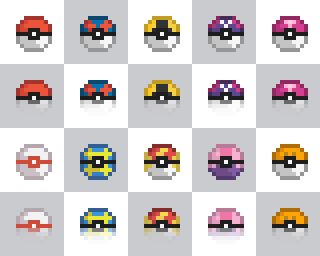
Each bobber, in both vanilla and when using Bebber Bobbers, is 16 pixels wide and 32 pixels tall. The top 16 pixels are the bobber as seen in the bobber machine and when casting your fishing rod. The bottom 16 pixels are the same bobber but as it appears when it's in the water. That is why the bottom halves of each of my bobbers get more translucent as you go down. The vanilla bobbers do this too; when the bobber is in the water, these translucent pixels will blend with the blue colour of the water and give the illusion of the sprite being partially submerged.
However, there is no requirement for you to do this and you are welcome to have the same sprite pictured in both the bottom and top halves of your bobber so that the appearance does not change when the bobber is in the water. The vanilla rubber ducky bobber does exactly that, in fact. But you must still have the bobber drawn twice, once in the top half and once in the bottom half, regardless. Speaking of, there's also nothing stopping you from making your bobber look completely and wildly different between the top half and the bottom half if you want. Go nuts.
Anyway, with those dimensions in mind, you can see that I have 10 different bobber styles in this spritesheet. The
bobber in the top left, both its opaque and slightly translucent halves, is a single bobber with a
SpriteIndex of 0. The bobber 16 pixels to its right would therefore have a
SpriteIndex of 1. The bobber below my first bobber, the one that is all white with
a red center line, would have a SpriteIndex of 5.
There is no requirement that your spritesheet follow these dimensions. Yours may be as wide or as tall as you wish.
You could even have a separate spritesheet for each individual bobber. Much like adding new objects to Data/Objects,
it's up to you. It is just very important that you remember that bobbers are 16x32 when calculating the SpriteIndex
you want.
Complete Example
1 | |
2 | |
3 | |
4 | |
5 | |
6 | |
7 | |
8 | |
9 | |
10 | |
11 | |
12 | |
13 | |
14 | |
15 | |
16 | |
17 | |
18 | |
19 | |
20 | |
21 | |
22 | |
23 | |
If you encounter any issues with using this mod, feel free to ping me @spiderbuttons in the Stardew Valley
Discord in the #making-mods-general channel.
Please do not DM me! Just ping me in the channel.